How to Remix Digital Art Online (Branch a Doodle on Grovetracks)
Most "remix" buttons on the internet make you a copy. You save someone else's image, keep the credit line if you remember, and the connection between your version and theirs quietly disappears. Grovetracks works differently. Every remix is a branch in a living structure called the doodle dag, and the path back to the original never gets lost, no matter how many generations of remixing happen after it.
This guide walks through branching a composition from start to finish: finding something worth building on, making it yours, and publishing it with the lineage intact.
What you'll need
- A browser. Browsing the gallery and branching a piece don't require an account. You'll need to sign in when you're ready to publish.
- A composition you actually want to build on. Branching works best when you start from something that genuinely sparks an idea, not just the first thing you click.
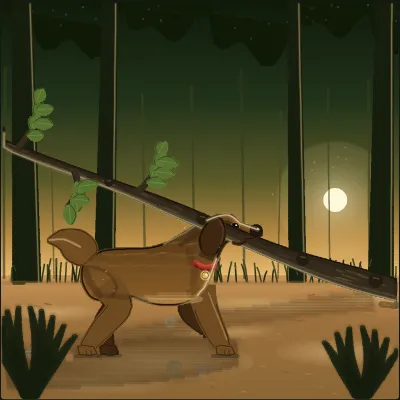
A composition like this one is a fair test for whether something is worth branching: a clear subject, a background already doing its job, and enough left unanswered (where was that branch headed?) to give you somewhere to take it.
Step 1: Find a composition to branch
Browse the gallery at grovetracks.com for something that catches your eye. You can filter by how a piece was made: hand-grown, traced, or procedural, depending on what kind of starting point you're after. Each composition shows how many times it has already been branched. A piece with a healthy branch count is often a good sign that it invites building on, but plenty of great branches start from something with zero.
Step 2: Click Branch
Open a composition you like and look for the Branch button on its page (it reads "Branch this" if no one has branched it yet). Click it, and Grovetracks opens a new draft on your own canvas, pre-seeded with the entire parent composition. Nothing about the original changes. You're working on your own editable copy from the first second.
Step 3: Make it yours
This is where the piece stops being someone else's and starts being a starting point for yours. Move and resize elements, recolor strokes, rotate and flip pieces, clip away what you don't need, and add new strokes or pieces of your own on top. Open the Layers panel if you want to reorder what sits above what. Every change is non-destructive to the source, so you can push a branch as far from the original as the idea takes you, or make one small change and call it done.
Step 4: Check the lineage before you publish
Before you publish, it's worth looking at where your branch sits in the larger structure. The composition page shows a Made from strip pointing back at the parent, and a View lineage link opens the fuller path as an overlay. From there, Explore the doodle dag opens an interactive graph (Grovetracks calls it a constellation) showing every generation of branches connected to that lineage, sometimes going back through several artists and several remixes before it reaches your version.
Step 5: Publish your branch
When the piece feels finished, or finished enough for now, publish it. Add a title and tags, confirm the content rating, and it goes live in the gallery with a permanent link. The connection to the parent composition is recorded automatically. You don't write a credit line by hand and you don't lose track of where the piece came from. That's the point of the doodle dag: attribution is structural, not something either artist has to remember to add.
Remix versus collage
Branching and collage solve different problems, and it's worth knowing which one you want. Branching takes one whole composition and hands you a complete editable copy with a direct line back to that single parent. Collage is broader: you pull in individual pieces from many different compositions and arrange them together into something new, and each piece keeps its own separate attribution inside the mix. If you're building on one idea, branch it. If you're pulling together several pieces from across the gallery into one arrangement, see the guide on making a digital art collage online.
What to do next
- Branch a branch. Find a composition that's already been remixed once and take it a generation further. The doodle dag has no limit on how many times a lineage can fork.
- Follow an artist whose work keeps getting branched. Their compositions tend to be the ones built with remixing in mind: enough structure to recognize, enough open space to add to.
- Trace a photo first, then branch it later. A traced piece is a normal composition once it lands on the canvas, so it can be branched by anyone the same as any other, including you, later, from a different angle. See the guide on turning photos into doodles if you want to start there.
Frequently asked questions
Is branching free? Yes. Browsing the gallery and branching a composition onto your own canvas don't require an account. You'll need to sign in when you're ready to publish your branch.
Does branching copy the whole piece, or just parts of it? The whole piece. Clicking Branch opens a new draft pre-seeded with the entire parent composition. From there you can change as much or as little as you want, including deleting most of it if that's the direction the idea takes.
Do I need the original artist's permission to branch their work? No. Publishing a composition on Grovetracks means it's open to be branched, and that's the core of how the gallery works. What you don't get is a silent copy: every branch keeps a recorded, explorable link back to the piece it came from.
Can someone branch my branch? Yes, and that's the whole idea behind the doodle dag. A lineage can fork as many times and as many generations deep as artists take it, with every step staying traceable back to the root.
Does the original artist get credited automatically? Yes. The lineage is structural, not a manual credit line. The "Made from" strip, the lineage overlay, and the doodle dag graph all show the path back to the original composition and every artist along the way.
Ready to find something to branch? Browse the gallery on Grovetracks →